> For the complete documentation index, see [llms.txt](https://magecomp-docs.gitbook.io/adobe-apps/llms.txt). Markdown versions of documentation pages are available by appending `.md` to page URLs; this page is available as [Markdown](https://magecomp-docs.gitbook.io/adobe-apps/documentation/google-indexing-adobe-app/remove-indexing.md).
# Remove Indexing
You can remove URLs from indexing.
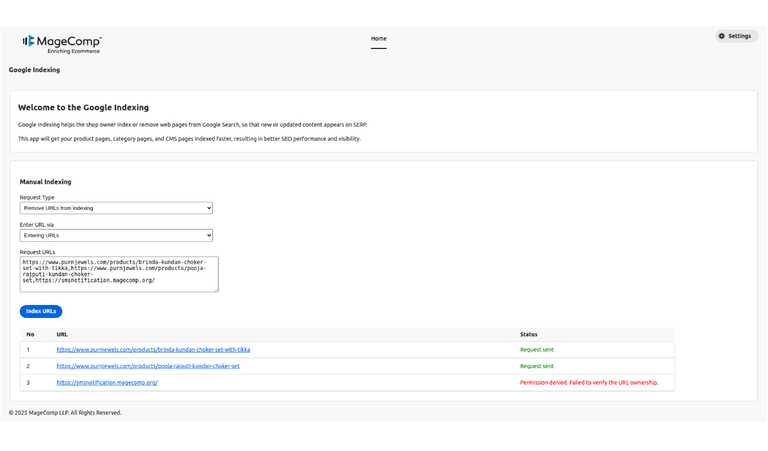
* **Request Type -** Select Remove URLs for Indexing.
* **Enter URL via -** Enter URLs manually or upload a CSV file.
* **Request URLs -** Enter URLs in the textarea to remove from indexing.
Then click on the Index URLs button to send the request to Google. After sending an indexing request, it will indicate whether the request was sent successfully or not.
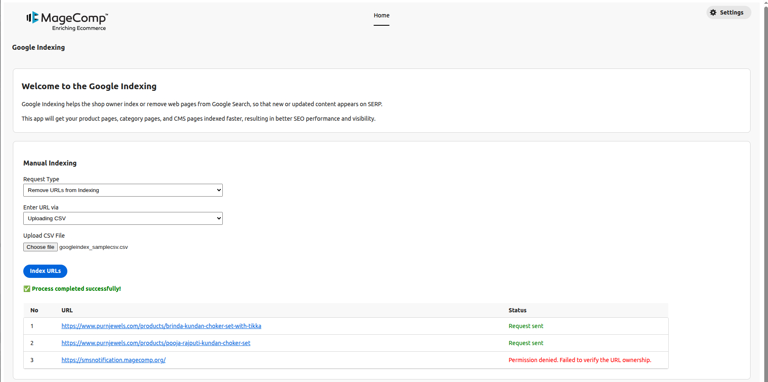
* **Request Type -** Select Remove URLs for Indexing.
* **Enter URL via -** Enter URLs manually or upload a CSV file.
* **Upload CSV File -** Upload a CSV file to remove from indexing.
Then click on the Index URLs button to send the request to Google. After sending an indexing request, it will indicate whether the request was sent successfully or not.