> For the complete documentation index, see [llms.txt](https://magecomp-docs.gitbook.io/adobe-apps/llms.txt). Markdown versions of documentation pages are available by appending `.md` to page URLs; this page is available as [Markdown](https://magecomp-docs.gitbook.io/adobe-apps/documentation/google-indexing-adobe-app/manual-indexing.md).
# Manual Indexing
After uploading the JSON file, you can index URLs.
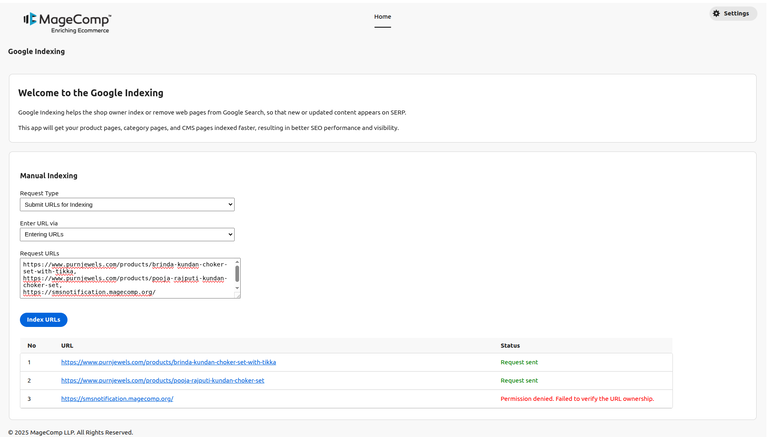
* **Request Type -** Select Submit URLs for Indexing.
* **Enter URL via -** Enter URLs manually or upload a CSV file.
* **Request URLs -** Enter URLs in the textarea for indexing.
Then click on the Index URLs button to send the request to Google. After sending an indexing request, it will indicate whether the request was sent successfully or not.
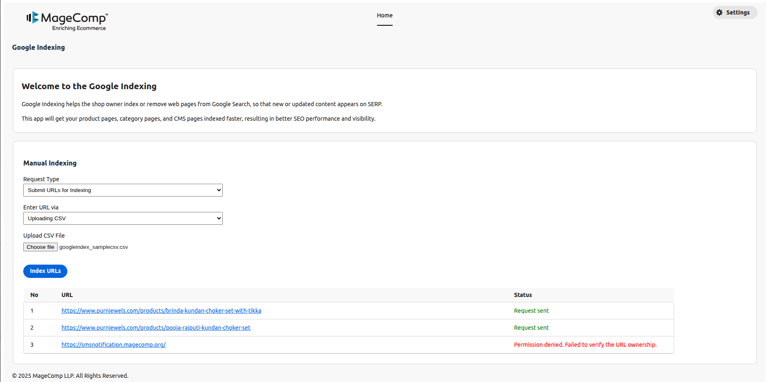
* **Request Type -** Select Submit URLs for Indexing.
* **Enter URL via -** Enter URLs manually or upload a CSV file.
* **Upload CSV File -** Upload a CSV file of URLs for indexing.
Then click on the Index URLs button to send the request to Google. After sending an indexing request, it will indicate whether the request was sent successfully or not.